SnapReceipt: turning a Cyrillic receipt into an expense
Expense tracking fails at the same point for everyone: data entry. The app asks you to type in every purchase, you do it for four days, and you stop.
SnapReceipt started from the idea that the photo of the receipt already contains everything needed. It only has to be read. This is what that turned out to involve, what we got wrong on the way, and where the product stands today.
Why Bulgarian receipts are a hard case
Reading a receipt sounds like a solved problem until the receipt is in Cyrillic. Bulgarian receipts abbreviate product names aggressively and inconsistently, often to the point where a human has to stop and work out what they bought. "КР. МЛЯКО ВЕРЕЯ 3% 1Л" is a litre of milk; "КРЕНВ. СВ. КФ" is a packet of frankfurters. Every chain abbreviates differently, and the same chain abbreviates the same product differently on different tills.
So this is not classic OCR turning pixels into text. We use Google Gemini to get to the meaning: not just what string is printed on the line, but what product it is, what category it belongs to, and which VAT group it sits in. The difference is between "ЛУК ЖЪЛТ 1КГ" as text and "vegetables, €1.12" as a record you can add up.
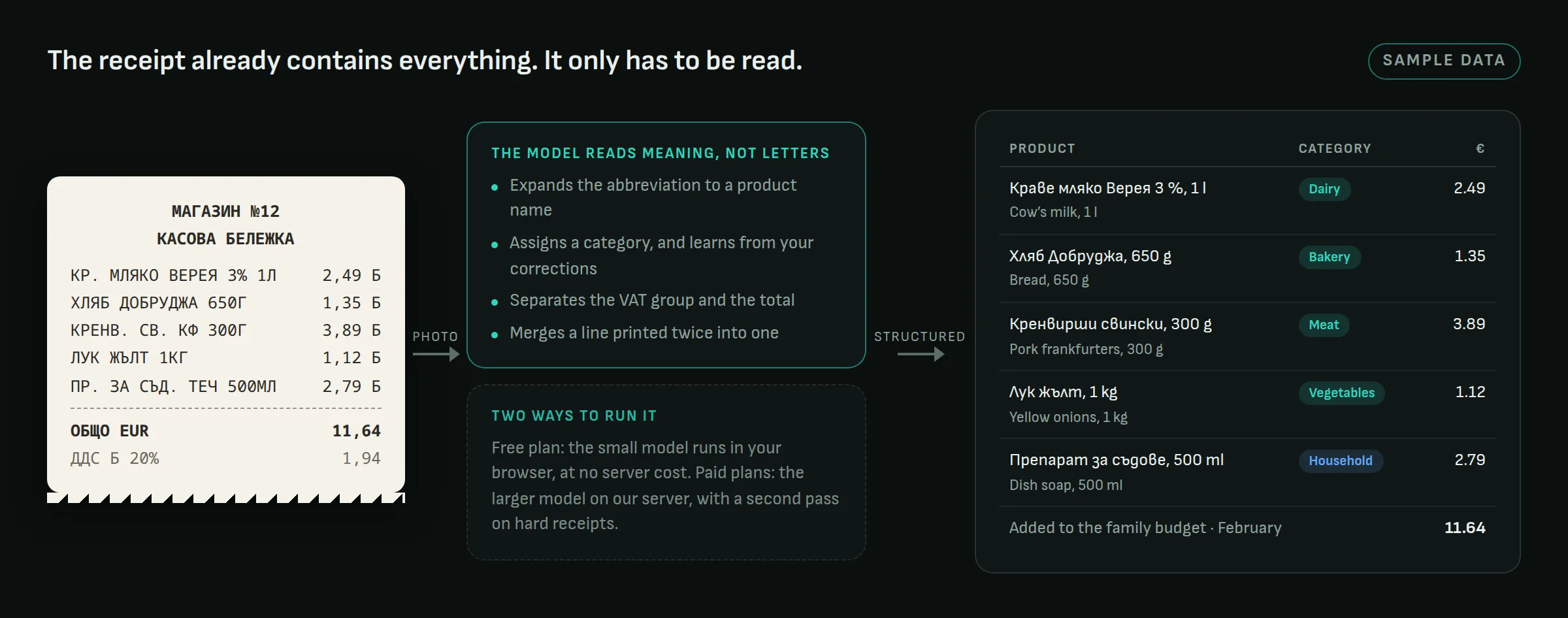
A few details in that middle step took longer than the reading itself. The model learns from corrections: if you move "Верея" from dairy to a category of your own, the next receipt lands there without asking. A line printed twice on one receipt, which happens more than you would expect, is merged into one. And since 1 January 2026 receipts are in euro. Everything is stored in euro; leva appear only as a secondary figure on screen, converted at the fixed rate, for as long as people still think in them.
Two ways to run the model
Anyone who has priced an AI product knows the uncomfortable part: every scan costs money, and a free plan with unlimited scanning is a bill that grows with success.
SnapReceipt runs the model in two places. On the free plan, the small, fast model runs in the user's own browser, against Google's free tier, so a free user costs us nothing per scan. That is what makes a free plan without ads possible, and it is stated as a rule in the product rather than as a marketing line. On the paid plans, scanning goes through our server on Google Cloud, using the larger model, with a second pass on receipts the first pass was unsure about. The server checks who is asking and what plan they are on before it spends anything, and the database rules forbid the app itself from writing anything about plans. Only the server can.
Real-time prices work the same way: when the app looks up what a product costs at the big chains this week, the answer is grounded in a live web search and cached for 24 hours, so a hundred families asking the same question cost one search.
The household is the unit, not the user
Personal finance is rarely personal. A household budget gets spent by several people, often at the same time and in different shops.
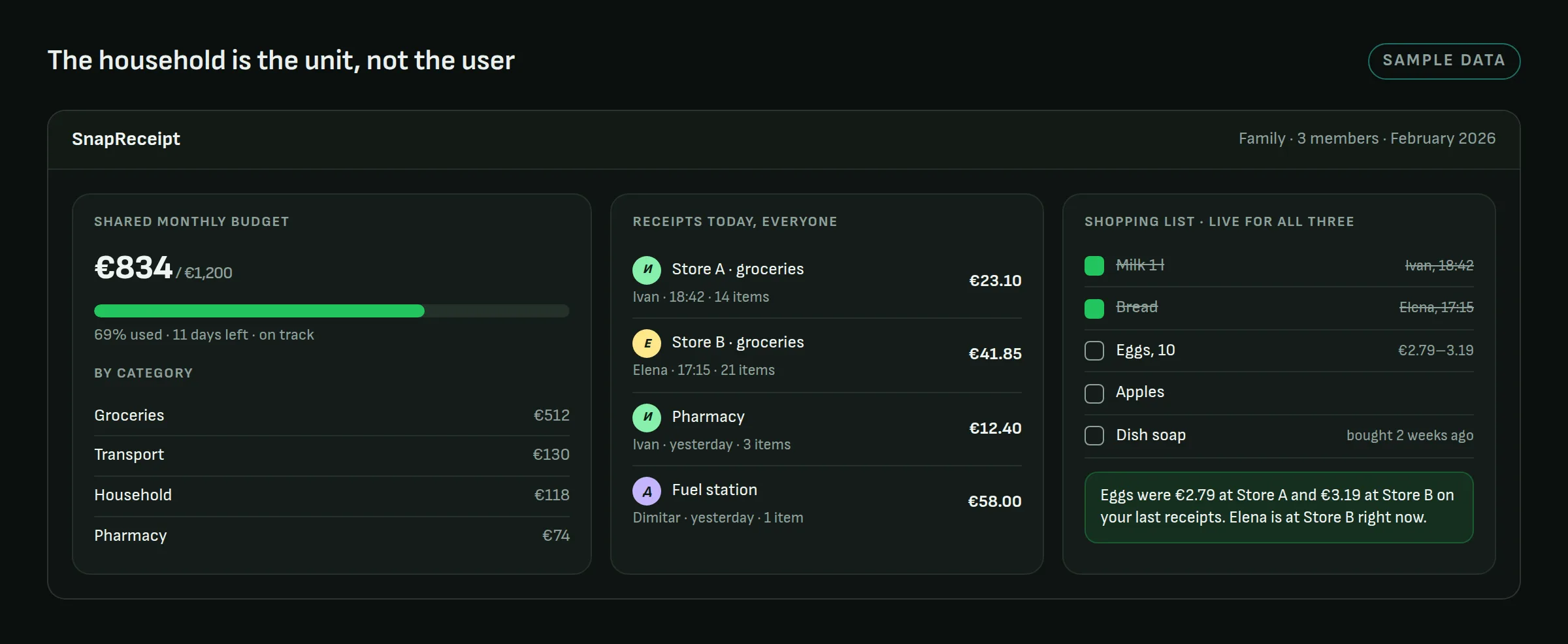
So a family is a first-class thing: someone creates one, the others join with a six-character code, and roles decide who can change the budget. From then on every receipt anyone scans lands in the same monthly budget, and the shopping list is one list. Two people in two different shops see the same state, including the small tip that eggs were cheaper at the other shop on the last three receipts.
That changes the data model at its foundations, and it is one of those decisions that is nearly impossible to add later if you started with a single user. We know, because we half-started with a single user: the shopping list originally lived only on the phone, which worked until we wanted the server to send reminders and discovered a server cannot read a phone's local storage. It moved to the shared database, where it should have been from the start.
The same receipts feed the rest: recipes suggested from what was actually bought in the last two weeks, loyalty cards kept as scannable barcodes, and warranties filed against the purchase they belong to, because a receipt is also proof of purchase.
A web app first, the stores second
SnapReceipt runs in the browser and installs to the phone straight from there. For a household app that spreads by word of mouth, every step between "I heard about this" and "I am using it" filters people out, and a link that opens immediately clears that barrier more easily than a store install.
That was the launch decision, and it was right. It is not the whole story. The same code is packaged for Android and iOS, and a Google Play listing is being prepared. A store brings distribution and also rules: payments have to go through the store's own billing, account deletion has to work from a web page without the app, and a data-safety form has to describe honestly what the app touches. Working through that list improved the product for web users too. The account-deletion flow, for one, now removes everything server-side instead of the roughly a third the first version reached.
What we got wrong
Two things worth admitting. The shopping list, above. And an early version of the privacy text that claimed receipt data reached the model in an anonymous form, which is true for names and account fields and not true for the photo itself: a receipt can carry the cardholder's name or a company's tax number. The wording was softened to match reality. A privacy policy that overclaims is a liability, not a reassurance.
Status
The product is live at snapreceipt.net, entirely in Bulgarian, with a free plan that carries no ads. Paid plans exist; the self-service checkout on the web is the piece being finished, and the store versions will use store billing when they ship. A separate price-tracking section is on the roadmap. We say so explicitly, because the gap between shipped and planned is exactly what usually gets papered over.