SnapReceipt
AI receipt scanning and family budgeting
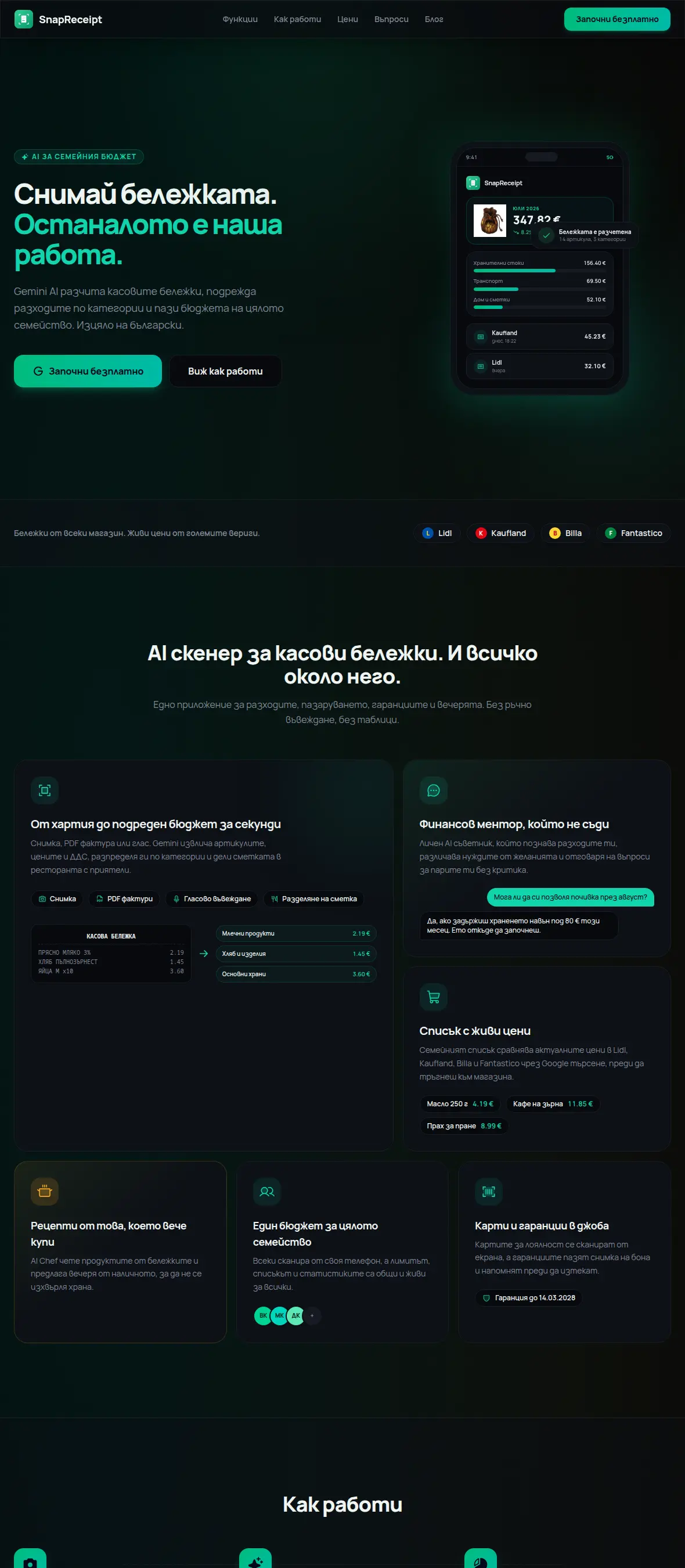
SnapReceipt turns a photo of a grocery receipt into structured, categorized expenses. It tracks where the money goes, compares prices between stores and keeps the whole family on one shared budget, on the web and on the phone.
Who is it for?
SnapReceipt is for households that want to know where the money actually went, without typing every purchase into a spreadsheet. A Bulgarian grocery receipt is the hard case: item names are abbreviated, printed in Cyrillic, and written differently by every chain. That reading is the part the app takes over, and everything else follows from it. We also build custom software for other businesses.
What it does
AI receipt scanning
Snap a photo and the AI reads the receipt into individual items, including Bulgarian Cyrillic receipts. It pulls out the item names, the prices and the VAT, not just the total at the bottom.
A scan that checks itself
The items have to add up to the total. A total line never becomes a purchase, a quantity printed above its item stays with that item, and a discount on the whole receipt is spread over the items instead of showing up as a negative line. When the sum still does not match, the receipt is flagged and read once more.
Automatic categorization
Every purchase lands in the right spending category without manual entry. PDF invoices are read the same way as paper receipts, so both end up in the same budget.
Spending analytics
See spending by category over time and understand where the budget actually goes. A monthly report written by the AI sums the month up, so nobody has to build a chart to see it.
Store price comparison
Compares what the same products cost in different stores, based on your own receipts. The shopping list carries live prices from Lidl, Kaufland, Billa and Fantastico, so the comparison happens before you buy, not after.
Shared family budgets
Family accounts share one budget, so everyone sees the same picture. Pro Family and Prime Family cover up to five people with one subscription, and a member who already has a higher plan of their own keeps it.
Real-time shopping lists
Shared shopping lists update live across every family member’s device.
Warranties and loyalty cards
A receipt is also proof of purchase, so a warranty is filed against the purchase it belongs to, and loyalty cards live in the same place.
AI financial mentor
Reads the household’s own spending history and answers questions about it, rather than handing out generic budgeting advice.
Recipes from what you bought (AI Chef)
Suggests what can be cooked from the items already on the receipt, which is where a budgeting app stops being only a ledger.
Installable app with push notifications
Installs to the home screen on iOS and Android and pushes notifications straight to the phone.
Install it on your phone
On Android it is in Google Play. On iPhone there is no App Store app: you install it from the browser, and it opens from its own icon like an app. Opened the link inside Instagram or Facebook? Open it in Safari first (the "…" menu, then "Open in browser").
iPhone, in Safari
- Open snapreceipt.net in Safari.
- Tap Share (the square with the arrow) in the Safari bar. If the bar has no Share, tap "…" first, then Share.
- If "Add to Home Screen" is not in the list, tap "More".
- Choose "Add to Home Screen", then Add.
iPhone, in Chrome
- Open snapreceipt.net in Chrome.
- Tap Share in the address bar at the top.
- If "Add to Home Screen" is not in the list, tap "More", then choose it and tap Add.
Android
- Install SnapReceipt from Google Play.
- Or open snapreceipt.net in Chrome, tap the menu ⋮ and choose "Install app".
Built with
The reading is done by Google Gemini. Firebase holds the accounts, the shared family data and the real-time sync; the heavier processing runs on Cloud Run. The app ships as a PWA with a Capacitor build for the stores, so one codebase serves the browser, iOS and Android, and notifications go out over Web Push.
Where it stands
Live and publicly available at snapreceipt.net, fully in Bulgarian. The free plan has unlimited AI scans, categories, the family budget and the shopping list, with no ads, and stays free. The paid plans, Starter, Pro and Prime, add more accurate AI models, the AI Mentor, PDF invoices and a longer history; the monthly ones start with 14 days free.